Is jQuery a framework or a library?
A framework is something that usually forces a certain way of implementing a solution, whereas jQuery is just a tool to make implementing what you want to do easier.
The features of jQuery.
- jQuery is a write less and do more javascript library.
- It helps us to make the use of javascript much easier.
- It simplifies the complicated things from javascript like the AJAX calls and the DOM manipulation.
- CSS manipulation.
The advantages of jQuery
The main advantage of jQuery is that it is much easier than its competitors. You can add plugins easily, translating this into a substantial saving of time and effort. In fact, one of the main reasons why Resig and his team created jQuery was to buy time (in the web development world, time matters a lot).
The open source license of jQuery allows the library to always have constant and fast support, constantly publishing updates. The jQuery community is active and extremely hardworking.
Another advantage of jQuery over its competitors such as Flash and pure CSS is its excellent integration with AJAX.
The disadvantages of jQuery
One of the main disadvantages of jQuery is the large number of published versions in the short time. It does not matter if you are running the latest version of jQuery, you will have to host the library yourself (and update it constantly), or download the library from Google (attractive, but can bring incompatibility problems with the code).
In addition to the problem of the versions, other disadvantages that we can mention:
- jQuery is easy to install and learn, initially. But it’s not that easy if we compare it with CSS
- If jQuery is improperly implemented as a Framework, the development environment can get out of control.
How the jQuery handles the issues related to partial page loads to the browser
Suppose when we want to load different views conditionally inside a single view. In other words, we are rendering nested view inside a single view/page based on menu items click in the parent view. In this case, if I click on the back button or forward button of the browser, it will not work as usual when we navigate from one page to another in web application and the way it saves the navigation history of different pages.
So for the case, when we are on the same page, but we are setting the nested view dynamically based on condition, we need some identifying criteria for each different nested view in the same page/View.
For identification purpose, we use the concept of Fragment URLs. In simpler words, we will use the concept of hash-based URLs which contain the character of sequences preceded by # at the end of actual Url of page/View. For each different nested view inside a single view which is set conditionally, we can append different character sequences preceded by #. The benefit of using this technique is that these are stored in the browser history and with this, if we click on back & forward buttons, the page is not refreshed and only the characters sequences changes, that we can handle partial view updates on the Page on browser events.
Selectors and their use in jQuery
The jQuery library harnesses the power of Cascading Style Sheets (CSS) selectors to let us quickly and easily access elements or groups of elements in the Document Object Model (DOM).
A jQuery Selector is a function which makes use of expressions to find out matching elements from a DOM based on the given criteria. Simply you can say, selectors are used to select one or more HTML elements using jQuery. Once an element is selected then we can perform various operations on that selected element.
jQuery API
jQuery is a fast, small, and feature-rich JavaScript library. It makes things like HTML document traversal and manipulation, event handling, animation, and Ajax much simpler with an easy-to-use API that works across a multitude of browsers.
Importance of DOM objects and DOM processing in jQuery
What the Document Object Model is
The Document Object Model is a programming API for documents. The object model itself closely resembles the structure of the documents it models. For instance, consider this table, taken from an HTML document:
      <TABLE>
      <ROWS>
      <TR>
      <TD>Shady Grove</TD>
      <TD>Aeolian</TD>
      </TR>
      <TR>
      <TD>Over the River, Charlie</TD>
      <TD>Dorian</TD>
      </TR>
      </ROWS>
      </TABLE>
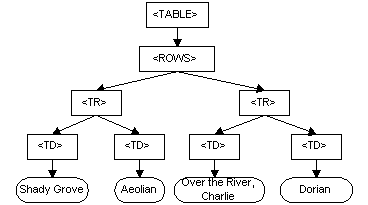
In the Document Object Model, documents have a logical structure which is very much like a tree; to be more precise, it is like a “forest” or “grove” which can contain more than one tree. However, the Document Object Model does not specify that documents be implemented as a tree or a grove , nor does it specify how the relationships among objects be implemented in any way. In other words, the object model specifies the logical model for the programming interface, and this logical model may be implemented in any way that a particular implementation finds convenient. In this specification, we use the term structure model to describe the tree-like representation of a document; we specifically avoid terms like “tree” or “grove” in order to avoid implying a particular implementation. One important property of DOM structure models is structural isomorphism: if any two Document Object Model implementations are used to create a representation of the same document, they will create the same structure model, with precisely the same objects and relationships.
The name “Document Object Model” was chosen because it is an “object model” is used in the traditional object oriented design sense: documents are modeled using objects, and the model encompasses not only the structure of a document, but also the behavior of a document and the objects of which it is composed. In other words, the nodes in the above diagram do not represent a data structure, they represent objects, which have functions and identity. As an object model, the Document Object Model identifies:
- the interfaces and objects used to represent and manipulate a document
- the semantics of these interfaces and objects – including both behavior and attributes
- the relationships and collaborations among these interfaces and objects
The structure of SGML documents has traditionally been represented by an abstract data model, not by an object model. In an abstract data model, the model is centered around the data. In object oriented programming languages, the data itself is encapsulated in objects which hide the data, protecting it from direct external manipulation. The functions associated with these objects determine how the objects may be manipulated, and they are part of the object model.
The Document Object Model currently consists of two parts, DOM Core and DOM HTML. The DOM Core represents the functionality used for XML documents, and also serves as the basis for DOM HTML. All DOM implementations must support the interfaces listed as “fundamental” in the Core specification; in addition, XML implementations must support the interfaces listed as “extended” in the Core specification. The Level 1 DOM HTML specification defines additional functionality needed for HTML documents.
Jquery event handler
Event handlers can be set on elements.
| Mouse events | Keyboard events | Form events | Document events |
| click | keypress | submit | load |
| dbclick | keydown | change | resize |
| mouseenter | keyup | focus | scorll |
| mouseleave | blur | unload |
Advanced Features
Object refers to the current object within the scope.Inside event handlers, refers to the element the event has triggered on.
- Data attributes.
- Refactoring with DOM object.
- Target on specific elements with generic names.
- Filters Css manipulation.
- Animation
 Programming Applications