What is the need for VCS ?
Version control systems are a category of software tools that help a software team to manage changes to source code over time.
Software developers working in teams are continually writing new source code and changing existing source code. The code for a project, app or software component is typically organized in a folder structure or “file tree”. One developer on the team may be working on a new feature while another developer fixes an unrelated bug by changing code, each developer may make their changes in several parts of the file tree.
Version control helps teams solve these kinds of problems, tracking every individual change by each contributor and helping prevent concurrent work from conflicting. Changes made in one part of the software can be incompatible with those made by another developer working at the same time. This problem should be discovered and solved in an orderly manner without blocking the work of the rest of the team.
Why VCS?
• Collaboration – With a VCS, everybody on the team is able to work absolutely freely – on any file at any time and the VCS will later allow you to merge all the changes into a common version
• Storing versions properly – A version control system acknowledges that there is only one project
• Restoring previous versions
• Understanding what happened
• Backup
Models of VCSs
Local version control systems
Local version control system maintains track of files within the local system. This approach is very common and simple. This type is also error prone which means the chances of accidentally writing to the wrong file is higher.
Centralized version control system
In this approach, all the changes in the files are tracked under the centralized server. The centralized server includes all the information of versioned files, and list of clients that check out files from that central place.
Distributed version control system
Distributed version control systems come into picture to overcome the drawback of centralized version control system. The clients completely clone the repository including its full history. If any server dies, any of the client repositories can be copied on to the server which help restore the server.
Git and GitHub, are they same or different?
What is Git:
“Git is a free and open source distributed version control system designed to handle everything from small to very large projects with speed and efficiency”
Git is a distributed peer-peer version control system. Each node in the network is a peer, storing entire repositories which can also act as a multi-node distributed back-ups. There is no specific concept of a central server although nodes can be head-less or ‘bare’, taking on a role similar to the central server in centralised version control systems.
What is GitHub:
“GitHub is a web-based Git repository hosting service, which offers all of the distributed revision control and source code management (SCM) functionality of Git as well as adding its own features.”
Github provides access control and several collaboration features such as wikis, task management, and bug tracking and feature requests for every project.
You do not need GitHub to use Git.
GitHub (and any other local, remote or hosted system) can all be peers in the same distributed versioned repositories within a single project.
Github allows you to:
- Share your repositories with others.
- Access other user’s repositories.
- Store remote copies of your repositories (github servers) as backup of your local copies.
Compare and contrast the Git commands, commit and push
commit: adding changes to the local repository
push: to transfer the last commit(s) to a remote server
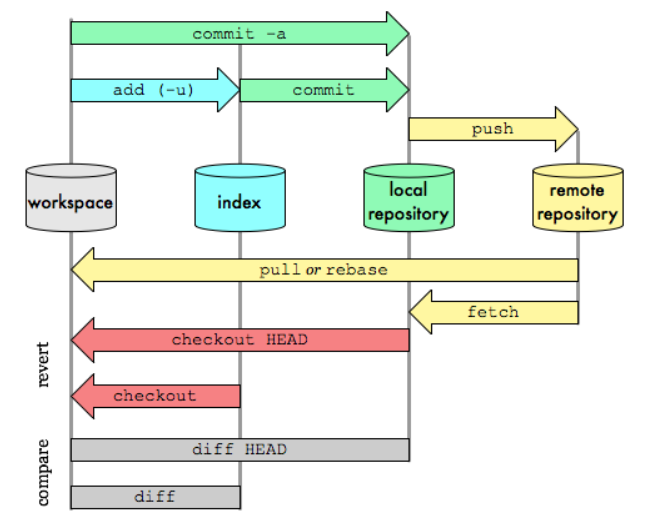
Use of staging area and Git directory
- staging helps you split up one large change into multiple commits
- staging helps in reviewing changes
- staging helps when a merge has conflicts
- staging helps keep extra local files hanging around
Benefits of CDNs
Server Load will decrease –
As a result of, strategically placed servers which form the backbone of the network the companies can have an increase in capacity and number of concurrent users that they can handle. Essentially, the content is spread out across several servers, as opposed to offloading them onto one large server.
Content Delivery will become faster –
Due to higher reliability, operators can deliver high-quality content with a high level of service
Therefore, the file has already been cached by the browser and the user won’t need to download again.
Lower Network Latency and packet loss –
End users experience improved stream quality. CDN users can, therefore, deliver high definition content with high Quality of Service, low costs, and low network load.
Improving website security – A CDN may improve security by providing DDoS mitigation, improvements to security certificates, and other optimizations.
How CDNs differ from web hosting servers
- Web Hosting is used to host your website on a server and let users access it over the internet. A content delivery network is about speeding up the access/delivery of your website’s assets to those users
- Traditional web hosting would deliver 100% of your content to the user. If they are located across the world, the user still must wait for the data to be retrieved from where your web server is located.
- Web Hosting normally refers to one server. A content delivery network refers to a global network of edge servers which distributes your content from a multi-host environment.
Free and commercial CDNs
- Cloudflare
- Google Hosted Libraries
- Microsoft Ajax CDN
- jsDelivr
Requirements for virtualization

| Operating Systems | Microsoft Windows Server 2016 x64 Editions Microsoft Windows Server 2012 R2 x64 Editions Microsoft Windows Server 2012 x64 Editions Microsoft Windows Server 2008 x64 Editions |
| Hard Drive | 500 GB recommended. Depending upon the number of virtual machines that you are planning to backup, ensure that the backup server computer has enough free space to store all virtual machine data. |
| Memory | 16 GB RAM minimum required |
| Processor | All Windows-compatible processors supported |
Different virtualization techniques in different levels

Set Architecture(ISA) level –
- Every machine has an instruction set
- This instruction set is an interface between software and hardware
- When virtualization is carried at this level, we create an emulator which receives all the instructions from the Virtual machines, like for example if a virtual machine wants to access the printer then that instruction will be passed to this emulator.
Hardware Abstraction Layer(HAL) level –
- As in Virtualization at ISA level, performance is reduced due to interpretation of every instruction so to overcome that we have virtualization at HAL level.
- We don’t interpret every instruction but we just check whether it is a privileged instruction or not.
- There may be many Virtual machines running simultaneously on the same Host system so if privileged instructions like memory management or scheduling tasks aren’t handled properly, system can crash.
Operating System(O.S.) level
Programming language level-
- When developers develop certain applications, they save the user from all the coding details by providing them Application User Interface(API).
- In this type, we use Library Interfaces to provide a different Virtual Environment(VE) for that application.
Application Layer level –
- In this kind of virtualization Virtual machines run as an application on the Host operating system
- We create a virtualization layer which is present above the Host Operating system and it encapsulates all the applications from the underlying O.S.
Hypervisor – A Hypervisor or VMM (virtual machine monitor) is a layer that exits between the operating system and hardware. It provides the necessary services and features for the smooth running of multiple operating systems.
How does the emulation is different from VMs?
Emulation involves emulating the virtual machines hardware and architecture. Microsoft’s VirtualPC is an example of an emulation based virtual machine. It emulates the x86 architecture and adds a layer of indirection and translation at the guest level, which means VirtualPC can run on different chipsets, like the PowerPC, in addition to the x86 architecture. However, that layer of indirection slows down the virtual machine significantly.
Virtualization, on the other hand, involves simply isolating the virtual machine within memory. The host instance simply passes the execution of the guest virtual machine directly to the native hardware. Without the translation layer, the performance of a virtualization virtual machine is much faster and approaches native speeds. However, since the native hardware is used, the chipset of the virtual machine must match. Usually, this means the Intel x86 architecture. VMWare is an example of this type of application for Windows.
Difference between VMs and containers/dockers, indicating their advantages and disadvantages
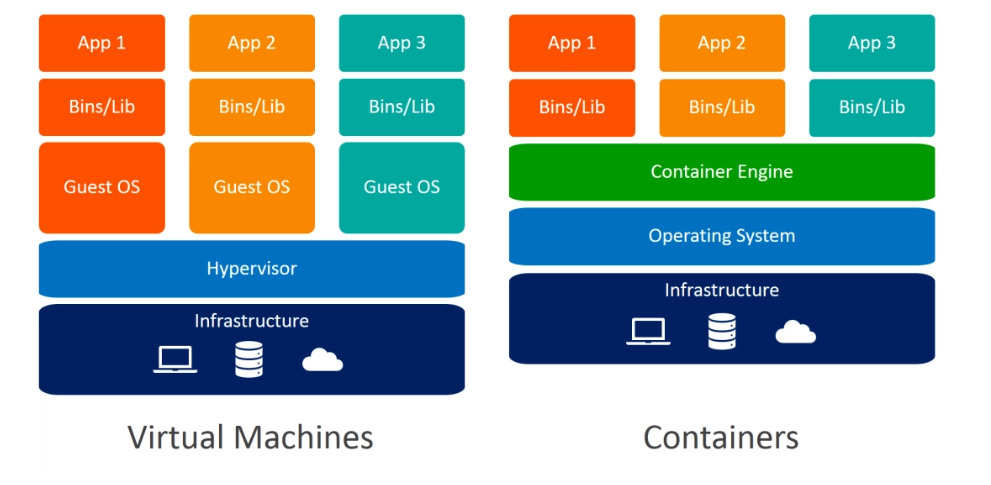
Virtual Machines (VMs)
Virtual machines (VMs) are an abstraction of physical hardware turning one server into many servers. The hypervisor allows multiple VMs to run on a single machine. Each VM includes a full copy of an operating system, the application, necessary binaries and libraries – taking up tens of GBs. VMs can also be slow to boot.
Benefits of VMs
- All OS resources available to apps
- Established management tools
- Established security tools
Popular VM Providers
- vSphere
- VirtualBox
- Hyper-V
- KVM
Containers
Containers are an abstraction at the app layer that packages code and dependencies together. Multiple containers can run on the same machine and share the OS kernel with other containers, each running as isolated processes in user space. Containers take up less space than VMs (container images are typically tens of MBs in size), can handle more applications and require fewer VMs and Operating systems.
Benefits of Containers
- Reduced IT management resources
- Quicker spinning up apps
- Less code to transfer, migrate, upload workloads
Popular Container Providers
- Linux Containers
- LXC
- CGManager
- Windows Server Containers
 Programming Applications